01Dashboard
The admin matches WordPress screen for screen; even the old .php URLs work. Posts, pages, media, menus and roles are where you expect them. You write in Pursae Editor, a real block editor, or in the Classic Editor if you prefer.
1:1 WordPress in a single binary. The plugins you need built in, a drag-and-drop builder ready, easy on RAM.
PHP, PHP-FPM, a web server, MySQL, cron, caching and security plugins. Each with its own config, its own updates, its own problems.
HTTP server, scheduled tasks, page cache, plugin runtime. Everything you used to install separately is handled by one core written in Go.
The dashboard, Pursae Editor and the starter themes ship inside the binary. No config to carry between parts, no versions to keep in step. One body, one version.
All it needs beside it is PostgreSQL 17. Database migrations run on start, and caching, scheduled tasks and the plugin sandbox live inside the core. One command is enough: wpgo serve
The same 1,000-post site, same theme, same container limits. The big number is Pursae, the one below it WordPress.
Same content and theme, same container limits · measured 9 November 2026How we measured
The chores that eat your time when you run a site are the core's job in Pursae. Here are the main differences.
The admin matches WordPress screen for screen; even the old .php URLs work. Posts, pages, media, menus and roles are where you expect them. You write in Pursae Editor, a real block editor, or in the Classic Editor if you prefer.
No PHP versions, no server config, no scattered files. A new release shows up under Dashboard › Updates and installs in one click; database migrations run on their own at start. Every release is signed, and the site refuses one whose signature doesn't match.
Store, page builder, SEO, caching, security, CDN, cookie banner, forum and more. Each one switches on in one click on the Plugins screen; nothing you leave off weighs on your site, and none of them needs its own licence.
Every plugin runs as a signed Wasm package in its own sandbox: no file system, network only with permission, limited memory. It asks you what it may access when you switch it on, and a package with a bad signature never installs. If something goes wrong, the plugin stops and the site keeps running.
Pursae has an MCP server built in. Connect Claude, Cursor or any other MCP client with OAuth 2.1 or an Application Password, and it can write posts, upload media, build menus and clear the cache. Every action runs with that password's permissions, so it can't touch anything it isn't allowed to.
Same 1,000 posts, same theme, same container limits. On a single post WordPress answers 58 requests a second and Pursae 394. Add WooCommerce, Yoast, ACF and Elementor and WordPress drops to 19, while Pursae, doing the same jobs with its built-ins, stays at 232. When you do want a cache, Pursae Cache switches on in one click and refreshes only the pages that changed.
One for pages, one for the store, one for backups. You install each one, update each one, and pay for some of them. In Pursae they come with the core.
On WordPressOn Pursae
01
plugins installed
| Topic | WordPress | Pursae |
|---|---|---|
| A separate plugin on WordPress, built into Pursae | ||
| Page builder | ElementorElementor Pro $60/yr | Web Builder |
| E-commerce | WooCommerce and paid add-onsSubscriptions $279 + Bookings $249 + Product Bundles $79 + Gift Cards $79/yrWooCommerce is free, its add-ons are paid | Pursae CommerceCard payments with Stripe, subscriptions, bookings and 14 modules |
| Multilingual | WPML, PolylangWPML Blog €39/yr | Pursae Multi LanguageLanguages, translations, hreflang |
| Backup and migration | UpdraftPlusUpdraftPlus Premium $70/yr | Pursae Backup ManagerThe whole site in one archive |
| Security | WordfenceWordfence Premium $149/yr | Pursae SecurityTwo-factor login, login lockout, custom login URL, activity log |
| SEO | Yoast SEOYoast SEO Premium $118,80/yr | Pursae SEOContent analysis, schema, sitemaps, redirects |
| Caching and CDN | WP Rocket, WP Offload MediaWP Rocket $60 + WP Offload Media $69/yr | Pursae Cache, Pursae CDNFull-page cache, offload to S3/R2, WebP image delivery |
| Contact forms and SMTP | Contact Form 7, WP Mail SMTPWP Mail SMTP Pro $99/yrContact Form 7 is free | Pursae Contact Form, Pursae SMTPSpam protection, email log and reports |
| Custom fields | ACFACF PRO $49/yr | Pursae Custom FieldsField groups, custom post types, options pages |
| Cookie banner and pixels | CookieYes, PixelYourSiteCookieYes $100 + PixelYourSite Pro $199/yr | Pursae Cookie, Pursae PixelGDPR banner, Consent Mode v2, server-side conversions |
| Visitor analytics | Jetpack Stats, Site KitJetpack Stats $100/yrSite Kit is free | Pursae AnalyticsCookieless; real-user Core Web Vitals |
| Forum | bbPressFree | Pursae ForumMembership, Google sign-in, levels and badges |
| Headless and GraphQL | WPGraphQLFree | Pursae HeadlessContent type builder, REST, GraphQL, webhooks |
| Maintenance mode | SeedProdSeedProd Basic $79/yr | Pursae Maintenance |
| Infrastructure | ||
| What it needs to run | PHP, a web server, MySQL, cron | One binary and PostgreSQLCaddy or Nginx in front for HTTPS |
| Updates | Core, theme and every plugin separately | One click in the dashboardEvery release is signed; the site won't install one that doesn't verify |
| Plugin licences, per year | $1.838,80 + €39≈ $1,880 a year, one site | 0 ₺No separate licences for the built-ins; Pursae is free on your own server |
| If a plugin crashes | The error can take down the whole site | The plugin stops in its sandbox, the site stays up |
A few of the sites running on Pursae today: a community, a design studio, a personal blog and a fan site.

A community for designers, developers and digital marketers, built around collaboration and opportunities.

An independent brand and digital design studio in Istanbul.
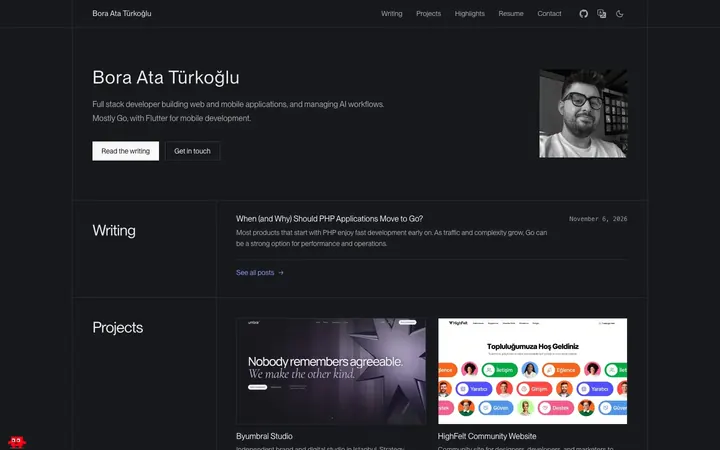
A personal site and blog with writing, projects and a CV in one place.

Episodes, characters, a gallery and music in a playful site with a video background.
Write one of the first plugins.
Toggle the permissions and watch plugin.json.
Anything not on the list is closed. If the plugin crashes, the site doesn't.
For when you want to read up and get going.
Three invitations, three ways in. Install the beta today, ask the community, or let us host your site when Hosting opens.
Today, on your own machine.
Install it with three commands and try moving your site over. Be the first to tell us what's missing.
Every day, on the Pursae forum.
Install, plugin and theme questions get answered there, and the team is around. Post your question, or answer someone else's.
1 December 2026, on our servers.
We take care of servers, HTTPS and backups. Join during the beta and your first three months are free; all we ask in return is your feedback.
By signing up you accept the Privacy Policy. Pricing and terms are in the FAQ.
The small team that builds, tests and designs Pursae.
If your question isn't here, ask on the community forum.
No. PHP plugins and PHP themes don't run on Pursae. The 18 plugins people need most ship with the core, and themes are made of Go templates and a theme.json. There are 68 ready-made themes with demo content, plus the Web Builder's Theme Builder.
Your content, yes. Export a WXR file from Tools > Export in WordPress and upload it under Tools > Import in Pursae. Posts, pages, terms, comments and menus come across, and media files are pulled from their public URLs. Products move with WooCommerce's product CSV. User passwords, settings, PHP plugins and themes don't move.
No. It runs anywhere you can run a binary and reach PostgreSQL: a VPS, a container platform or your own server. If you'd rather not deal with servers, Pursae Hosting opens on 1 December.
If you join during the beta, the first three months are free and then it's $5 a month. No card needed to sign up, and you can export your site and move it to your own server at any time. On your own server, Pursae is always free.
Pursae serves HTTP itself. On your own server, put a reverse proxy like Nginx or a PaaS in front of it for TLS. On Pursae Hosting, that's our job.
For new brochure and content sites, yes. Stores can take card payments through Stripe; local providers like iyzico aren't there yet. Before you take a site live, go through the security and production notes first. We track bugs reported during the beta openly on GitHub.
Yes. Pursae has an MCP server built in. Connect a client like Claude or Cursor with OAuth 2.1 or an Application Password, and it can write and publish posts, upload media, build menus, switch plugins on and off and clear the cache. Every action goes through the REST API with that password's permissions.
Once a day, a production install sends hub.pursae.com its site URL, Pursae version, language, operating system, licence key if there is one, the active theme and the list of installed plugins and themes. Your content, users, email addresses, passwords, visitors and orders are never sent. WPGO_HUB=off turns it off completely; one-click updates, signed plugins and the marketplace switch off with it.
Choose which cookies you allow. Necessary cookies are always on because the site does not work without them. Your choice is stored in a cookie on this device.
Privacy policyCookie policyInformation notice (KVKK)
Needed for the site to work, always on.
Remembers the tab you picked and the boxes you closed.
Ad pixels. None load unless you allow them.
Your consent ID: —